QIDI Plus5 Review: Is It a High-Speed 3D Printer for Larger Prints

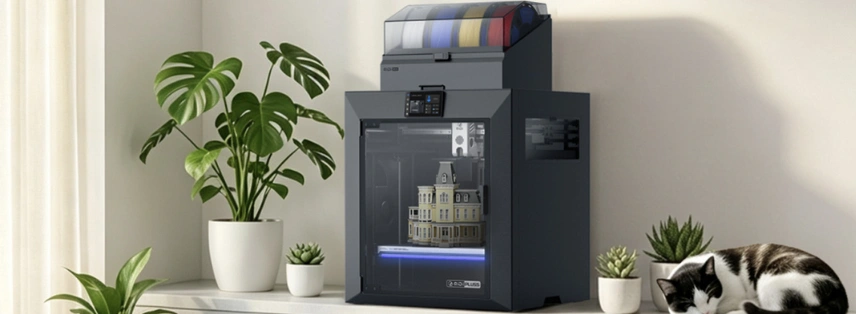
The QIDI Plus5b is known to be designed for users who want to move beyond basic 3D printing. This review shows how this printer offers more flexibility for larger and more demanding projects.
All featured products are selected by our editors and may include affiliate links. If you purchase through these links, we may earn a commission.
3D printing has come a long way, but larger and more demanding projects can still put pressure on a printer. Aspects like build size, printing speed, temperature control, and stability all become more important when you move beyond basic prints. A printer also needs to handle different materials without unnecessarily complicating the process.
The QIDI Plus5 is designed with these needs in mind. It combines a large build area with high-temperature printing, an enclosed, heated chamber, and several automated features to make printing more stable and convenient. It also supports a wide range of materials, making it suitable for users working on more advanced projects.
QIDI Plus5 3D Printer Overview
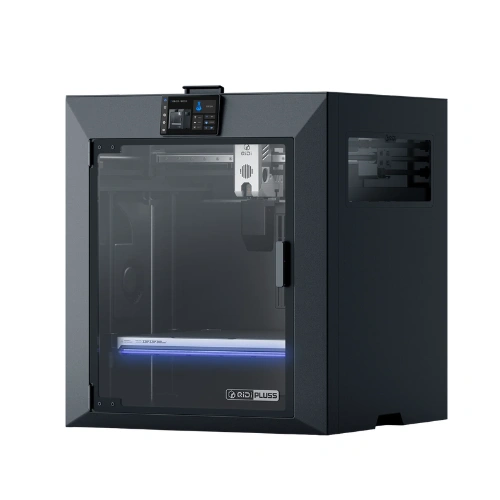
The QIDI Plus5 3D printer is designed to take on larger and more demanding printing projects. It is aimed at DIY makers, designers, and experienced users who need a printer that can handle more than basic everyday models. The overall focus is on giving users a more capable and flexible printing setup. From larger projects to more advanced materials, the Plus5 is built for people who want to explore more possibilities with 3D printing.
Specifications of QIDI Plus5
The Plus5 is built with a strong focus on printing speed, stability, temperature control, and ease of use. Its specifications give you a better idea of how the printer is designed to handle different types of projects and printing requirements.
More Room for Bigger Projects
The 320 × 320 × 300mm build area gives you more space for larger models and bigger batches. It is a useful upgrade if smaller printers have been limiting the size of your projects.
Built for High-Temperature Printing
The high-temperature nozzle and heated chamber make the Plus5 suitable for materials that need more controlled printing conditions. This gives you more flexibility when working with engineering filaments.
Stable Movement at Higher Speeds
The CoreXY setup uses a high-hardness linear guide rail and wider belts to support stable toolhead movement. This is especially useful when printing at higher speeds.
Less Manual Calibration
Automatic leveling takes care of bed calibration before printing, while the printer also includes features such as AI camera detection, filament sensing, and power-loss recovery.
Even Heat Across the Print Bed
The heated bed reaches up to 120°C and is designed to provide more consistent heat across the printing surface. The RGB status light also gives you a quick visual indication of the printer's current state.
A More Controlled Printing Environment
The enclosed design helps maintain a more controlled printing environment. Its filtration system combines a pre-filter, HEPA filter, and activated carbon layer to help reduce particles and odors.
Extra Options for More Advanced Printing
The Plus5 can be paired with the Polar Cooler and QIDI BOX for additional capabilities. QIDI BOX adds multi-color and multi-material printing, while the Polar Cooler can help with temperature control for certain materials.
Getting Started Is Straightforward
The printer is designed to reduce the amount of setup needed before getting started. With QIDI Maker, supported designs can be selected and sent to the printer with a simple workflow.
How Does the QIDI Plus5 Work?
The QIDI Plus5 heats the filament and feeds it through the hotend while the CoreXY system moves the print head across the build area. Automatic leveling helps prepare the print surface, while the heated bed and chamber maintain suitable temperatures during printing. Moreover, built-in sensors and the AI camera also monitor the process for common issues.
How to Use the QIDI Plus5
You should start the Plus5 with a few basic setup steps. Once the printer is ready, you can load your filament, choose a model, and prepare it through QIDI Studio or another supported slicer. The printer also supports printing through Wi-Fi, Ethernet, or USB.
Set Up the Printer: Place it on a stable surface and check that the power supply matches your region.
Load the Filament: Insert the 1.75mm filament into the extruder and check that it feeds properly.
Prepare Your Model: Open your STL, OBJ, 3MF, or STEP file in QIDI Studio or another supported slicer.
Choose the Settings: Select the right material and print profile for your project.
Start the Print: Send the file through Wi-Fi, Ethernet, or USB and let the printer handle automatic leveling.
Monitor the Print: Use the camera and built-in sensors to keep track of the printing process.
Pros and Cons of QIDI Plus5 3D Printer
Every 3D printer has its strong points and a few areas that may not suit everyone. Here’s a quick look at what the QIDI Plus5 does well and where you may need to make some compromises.
Pros
- Large build area for bigger models and batch printing.
- High-temperature setup supports a wide range of materials.
- Automatic leveling reduces manual setup.
- AI camera and smart sensors add extra monitoring.
- Heated chamber helps with demanding prints.
- QIDI BOX adds multi-color and multi-material options.
Cons
- Advanced features may feel overwhelming for first-time users.
- Higher-temperature materials require more careful settings and handling.
Customer Feedback on the QIDI Plus5 3D Printer
No doubt, customer feedback for the QIDI Plus5 has been encouraging so far. One owner who upgraded from the QIDI X-Plus 3 said the Plus5 Combo produced better prints and praised its hands-free automatic bed leveling. They also found the camera quality good and liked the built-in time-lapse feature. Overall, the feedback praised reliable printing and useful automated features that make the Plus5 more convenient.
FAQs
What Changed from the Qidi Plus4 to the Plus5?
The Plus5 builds on the Plus4 with a larger 320 × 320 × 300mm build area, improved 65°C chamber heating, upgraded auto-leveling, 3-stage air filtration, and a more connected QIDI Maker and QIDI Studio workflow.
Is the Qidi Plus5 Better than the Plus4?
The Plus5 makes more sense if you need the extra build space and newer features. If the Plus4 already meets your project size and material needs, the upgrade may not be necessary.
How Large Can the Qidi Plus5 Print?
It has a 320 × 320 × 300mm print volume, giving you more room for larger models and batch printing.
The QIDI Plus5 is aimed at users who want more flexibility from a 3D printer rather than just a basic machine for smaller models. It is not necessarily the right choice for someone who only prints small and simple models. But for makers, designers, and users who want to work with larger prints or more advanced materials, the Plus5 offers a strong and more capable setup.
Stay tuned to PubMyBrand for more info about 3D printers.
Recent Blogs
-
QIDI Plus5 Review: Is It a High-Speed 3D Printer for Larger Prints
The QIDI Plus5b is known to be designed for users who want to move beyond basic 3D printing. This review shows how this printer offers more flexibility for larger and more demanding projects.
-

Glow Guide: Fertility, Pregnancy and Women’s Health
Discover how Glow supports women with fertility, period, pregnancy, and baby tracking tools, plus health resources, personalized insights, and a community for different stages of motherhood.
-
Wiskii Active Review: Are These Stylish Gym Outfits Worth The Hype?
Explore our comprehensive Wiskii Active review. We analyze the brand quality, popular jumpsuits and leggings, pricing, and whether these stylish gym outfits are truly worth your money.
-

Best Outdoor Gear for Easy Camping and Travel
Make your next trip easier with the right outdoor gear for comfort, shade, and outdoor cooking. Choose practical essentials that help you enjoy camping and travelling with fewer everyday hassles.
-

7 Elegant Ways to Wear Your Silk Laundry Silk Scarf
A silk scarf is just a simple accessory. Think again. A silk scarf can instantly elevate an outfit, adding a touch of elegance, personality, and effortless style. From neck wraps to handbag accents, there are plenty of chic ways to style this versatile accessory.